
Less friction between you and your next move
Travian already demands your attention: building queues, troop movements, alliance messages, and the race for your next village. Your tools should make those decisions easier. We built TraviTools around an ad-free workspace, clear navigation, and practical next steps.
Updated 13 October 2026. This comparison is written by TraviTools. We reviewed Gettertools’ public tool directory and Trooptool feature descriptions. ‘Not documented’ means we could not verify that specific workflow in those public pages. Screenshots show the current interface using a signed-in fictional demo account and actual messages in our Discord test server; the activity chart uses public player statistics with account-identifying areas excluded.
Feature comparison at a glance
Compare the main tools and workflows available across both sites. ✓ means available. A red cross in the Gettertools column means an equivalent was not verified in its public documentation; it does not establish that the feature is absent. Coming soon marks planned TraviTools tools that are not available yet.
Checked 13 October 2026 against the Gettertools tool directory and Trooptool feature list. TraviTools plan requirements are noted below; see pricing for the current plans. Ease of use is our editorial assessment, explained through the workflows and screenshots.
| Feature | TraviTools | Gettertools |
|---|---|---|
| Ad-free workspace | ✓ Available | ✕ |
| Saved second-village build checklist | ✓ Available | ✕ |
| Dual Finder with UTC coverage matching | ✓ Available | ✕ |
| Player and alliance Watchlist | ✓ Available | ✕ |
| Configurable Watchlist notifications | ✓ Available | ✕ |
| Estimated active days by weekday | ✓ Personal / Alliance buyer | ✕ |
| Private watchlist alerts in Discord | ✓ Personal / Alliance buyer | ✕ |
| Nearby inactive village alerts in Discord | ✓ Personal / Alliance buyer | ✕ |
| Multiple Travian accounts in one profile | ✓ Personal / Alliance buyer | ✕ |
| Crop upgrade build order and saved progress | ✓ Available | ✕ |
| Alliance statistics, wings and member strength | ✓ Available to alliance owners | ✓ Trooptool group statistics |
| Scouting map with report screenshots | ✓ Available | ✕ |
| Scouting requests with completion tracking | ✓ Available; Discord on Alliance | ✕ |
| Resource Push with daily member contributions | ✓ Alliance plan; drafts free | ✕ |
| Defence requests with sent and pledged troops | ✓ Available; Discord on Alliance | ✓ Defence tables; workflow differs |
| Shared Discord alerts and operation reminders | ✓ Alliance plan | ✕ |
| Running Travian server list | ✓ Legends and Kingdoms | ✓ Available |
| Upcoming servers and Dual Finder listings | ✓ Available | ✕ |
| Player search and profiles | ✓ Available | ✓ Available |
| Alliance search and member lists | ✓ Available | ✓ Available |
| World statistics and rankings | ✓ Available | ✓ Available |
| Population history | ✓ Available | ✓ Available |
| Village conquest tracking | ✓ Available | ✓ Available |
| Inactive player finder | ✓ Available | ✓ Available |
| Alliance maps | ✓ Available | ✓ Available |
| Troop management | ✓ Available | ✓ Available |
| Alliance attack planning | ✓ Available | ✓ Available |
| Battle-report parsing and archive | ✓ Available | ✓ Available |
| Culture-points calculator | ✓ Available | ✓ Available |
| Smithy upgrade break-even calculator | ✓ Available | ✓ Available |
| Sidebar navigation and search | ✓ Available | ✓ Available |
| Dedicated NPC resource calculator | Coming soon | ✓ Available |
| Dedicated interception calculator | Coming soon | ✓ Available |
| Dedicated World Wonder crop supply calculator | ? Not available; Resource Push tracks contributions | ✓ Available |
No ads. More room for the tool you came to use.
TraviTools has no ads. There are no advertising banners competing with your filters, calculator settings, or results. The page is built around the task: choose your inputs, read the output, and decide what to do next.
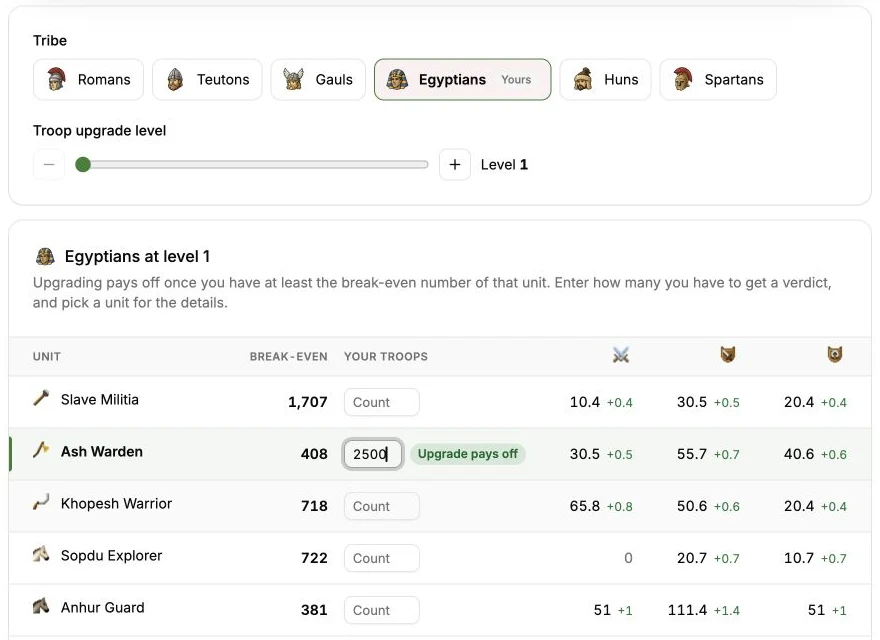
Our interface uses readable labels, clearly separated settings, and space around the controls. In the Smithy calculator, choose a tribe and an upgrade level, then enter your troop counts to get a break-even verdict for each unit. Select a unit for the detailed explanation. The tool helps you interpret the numbers and choose your next investment.
The screenshot shows the TraviTools experience; it is not evidence that Gettertools displays ads in every session.
Easier navigation, from world research to account planning
TraviTools groups its sidebar into Tools, Calculators, and Resources. Account and Alliance sections keep related work together, while Travian Analyzer opens direct links to server statistics, conquests, player search, and alliance search. Search tools lets you narrow the navigation without memorizing where a feature lives.
The selected player and world stay within reach, and breadcrumbs show where you are. Open Player Search, look up a rival, then move to Inactive Finder or World Conquests through the same navigation. Our aim is much easier navigation for the tasks you repeat throughout a server.
Gettertools also has a sidebar and search. Our preference is about how TraviTools organizes and presents the workflow, rather than a claim that Gettertools has no navigation.
A second-village checklist that remembers your progress
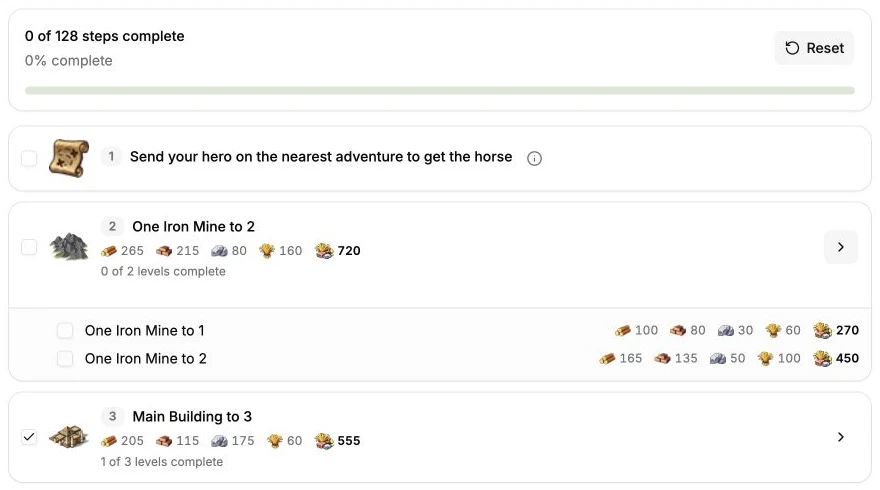
One of the clearest reasons to choose TraviTools is Second Village Guide. It turns an opening build order into an interactive checklist: follow the steps, expand level-based tasks, and mark completed work as you go.
Sign in and add your world to save progress and return to the same checklist later. The progress bar makes your position visible at a glance, which is especially useful when you leave a session halfway through a building sequence.
We found no equivalent saved, step-by-step second-village checklist in Gettertools’ public tool directory. This is a distinct workflow beyond a culture-points calculator. Follow the second-village guide for the assumptions behind the build order.
Dual Finder: find someone who covers your quiet hours
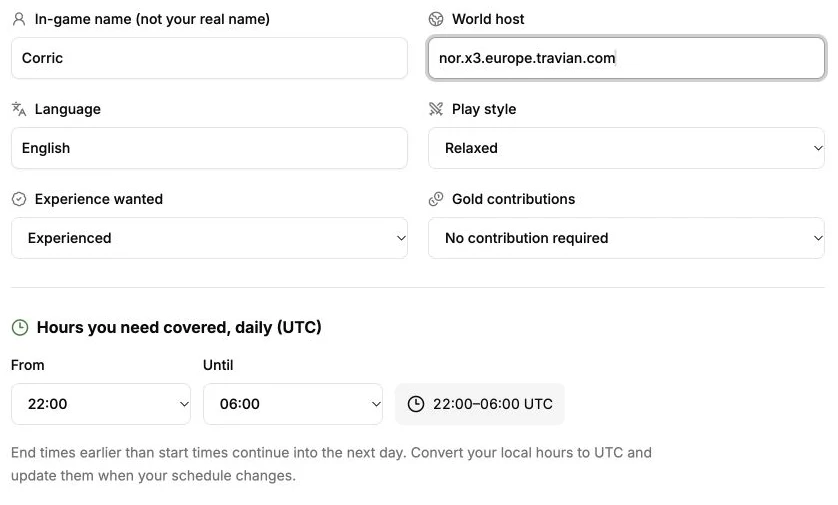
A good dual needs to fit your schedule as well as your ambitions. Dual Finder brings accounts needing a dual and players looking for an account into one place. Filter by world, language, and play style, then compare the UTC coverage hours in each listing.
Listings include experience and Gold preferences, so you can discuss expectations before teaming up. Signed-in members can view contact usernames; posting your own listing lets you describe the coverage you need or can offer. Matching listings on the same world can show overlapping requested hours.
We found no dedicated dual-matching directory in the Gettertools pages reviewed. Its Trooptool documents member online times for planning, which serves a different purpose from finding a new teammate. TraviTools helps you make that initial connection; invitations and account access still happen through the Travian lobby.
Watchlist with notifications: see what changed
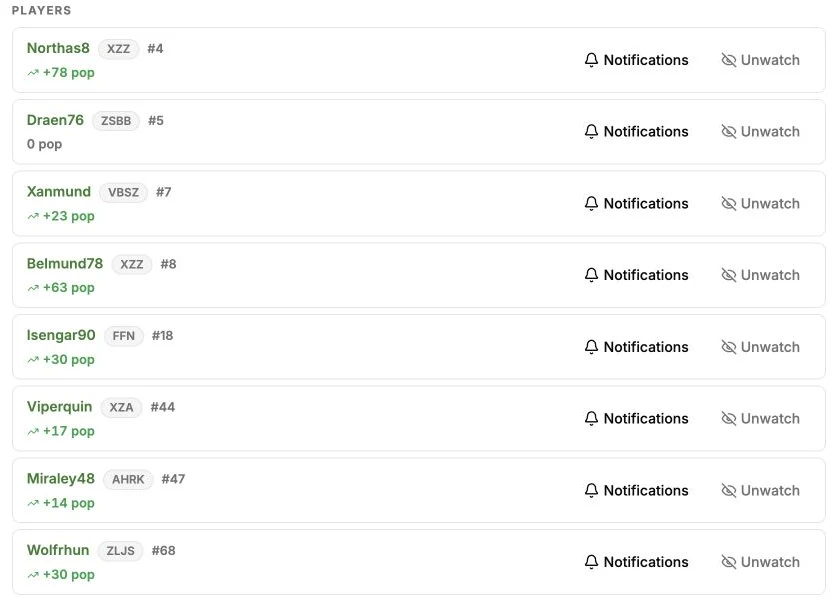
With the TraviTools Watchlist, you can follow players and alliances and choose the changes that matter: settlements, conquests, alliance moves, growth, inactivity, and membership changes. Notifications surface changes between daily snapshots, giving you a focused starting point for your next check-in.
That helps answer a practical question: what changed since I last looked? It also reduces the need to reopen the same profiles simply to discover whether anything happened. These are snapshot-based updates, not live alerts about troop movements or a player’s online status.
Gettertools provides player and alliance statistics. We found no equivalent configurable player-and-alliance change-alert workflow documented in its public directory and Trooptool description. That makes the TraviTools Watchlist another strong reason to try the newer workspace.
Choose notifications for each watched player or alliance
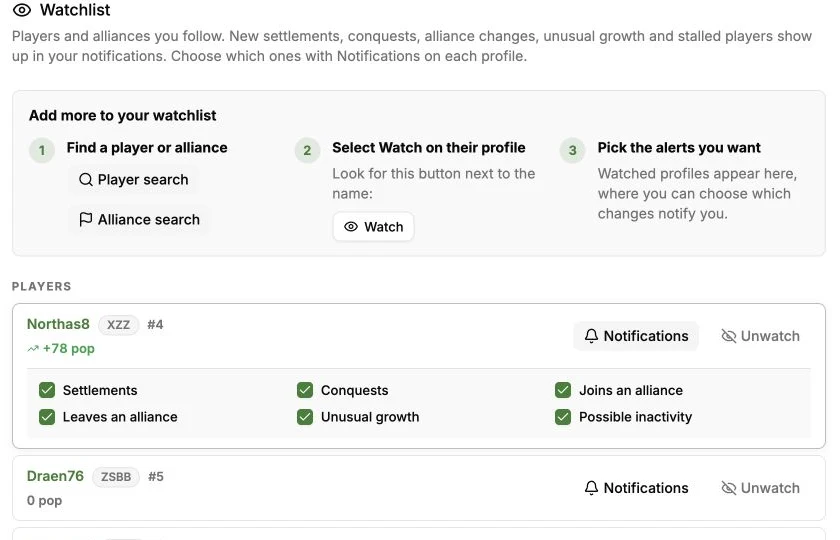
Open Notifications beside a Watchlist entry to choose the events you want to hear about. For players, the controls cover settlements, conquests, joining or leaving an alliance, unusual growth, and possible inactivity. Alliance entries also support member-join and member-leave notifications.
The selected events appear in your TraviTools notifications as daily snapshots reveal changes. You can follow several players and alliances while tailoring the updates for each one. The example below shows the player notification options expanded.
One notifications page for the changes worth checking
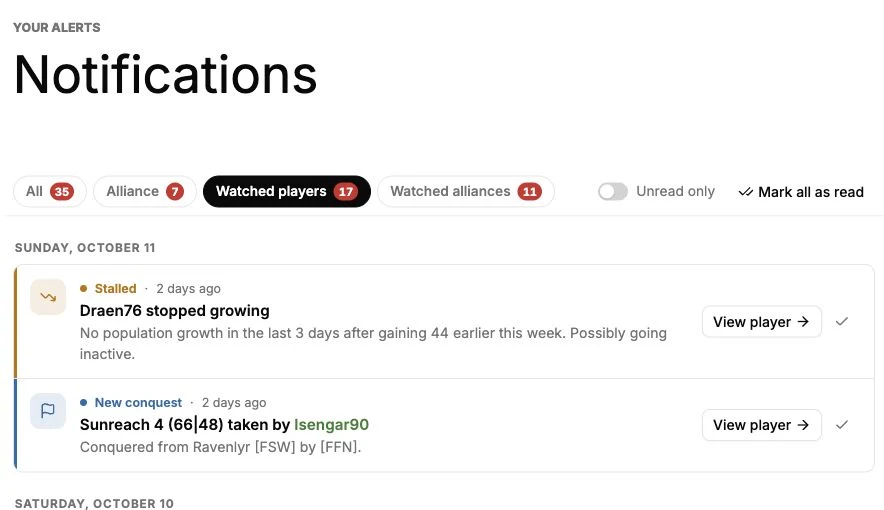
The Notifications page brings together incoming attacks, alliance invitations, and changes from the players and alliances you follow. It gives each alert a direct route back to the relevant TraviTools page, so you can investigate a change instead of hunting through separate tools.
Filter the feed by alliance activity, watched players or watched alliances, and use Unread only to focus on alerts you have not reviewed. Each row lets you open the related profile or workflow and mark the alert read.
Discord coordination with actions your alliance can use
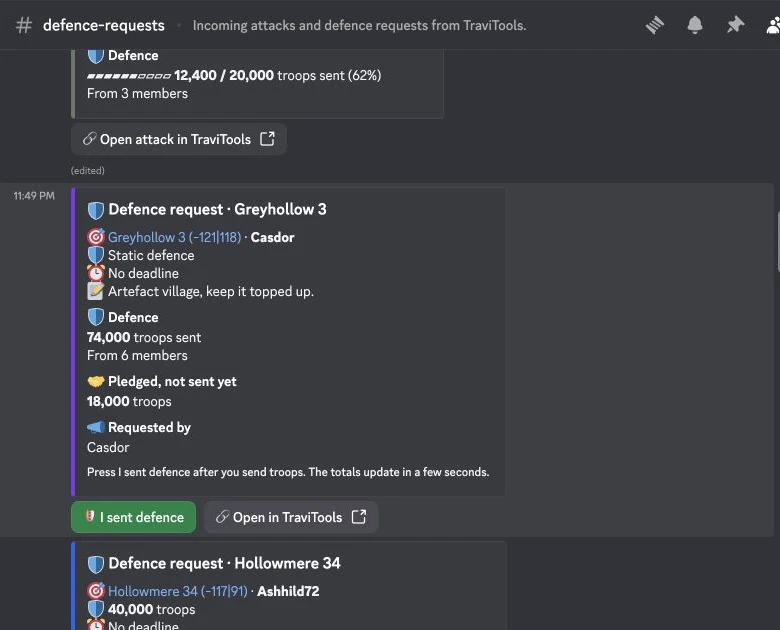
TraviTools can also deliver watchlist changes privately in Discord. Choose the events per watched player or alliance in the Watchlist, then set your delivery schedule in Discord settings. A test message confirms that private delivery works before alerts are enabled.
The Alliance plan brings shared alerts, operations, defence requests, resource pushes and scouting workflows into your alliance’s Discord server. The real Discord screenshot below shows a fictional static-defence request: troops already sent, pledges still outstanding, and an action members can use after sending reinforcements.
Estimated active days: spot a player’s weekly growth pattern
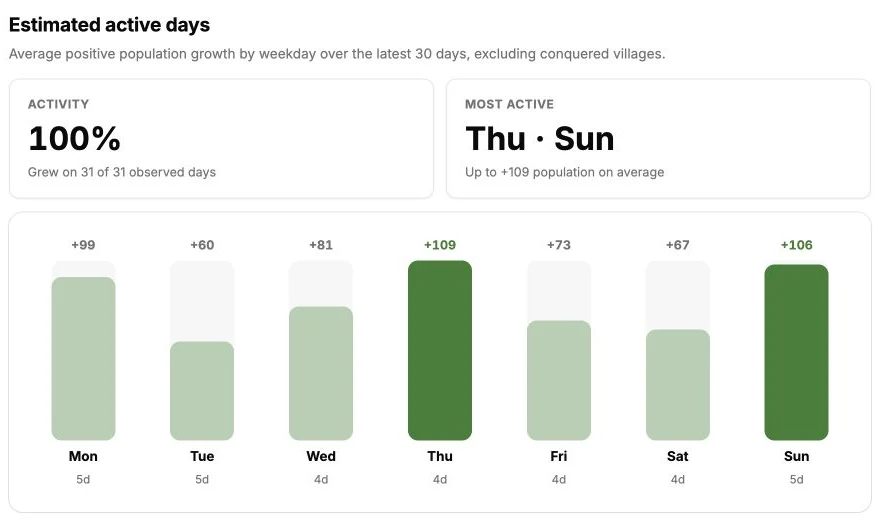
Open a player profile from the Watchlist or Player Search and look for Estimated active days. The chart compares average positive population growth for each weekday over the latest 30-day window in the available snapshots. Known conquered-village population is adjusted out so taking a village does not masquerade as ordinary building growth.
In this example, Thursday averages +109 population and Sunday +106, compared with +60 on Tuesday and +67 on Saturday. The player grew on every observed day, but development was much stronger on some weekdays than others. That distinction helps you decide which days deserve closer checks of the player’s growth and village history. Each weekday has four or five observations, shown below its bar.
This is a growth-based estimate, not a record of logins, online hours, or troop activity. A player can raid or defend without gaining population; missing snapshots and unknown conquest populations can also affect the estimate. We found no equivalent weekday growth chart documented in the Gettertools pages reviewed.
More planning tools added since the original comparison
The Crop Planner builds a resource-costed upgrade order for croplands, Grain Mill, Bakery, oases and Waterworks. You can save a plan for an existing village or a future cropper and mark upgrades built as you go. The Smithy calculator now includes tribe buttons, a level slider and verdicts based on your own troop counts.
Alliance work now includes Scouting Map report uploads, defence requests with reinforcement tracking, and Resource Push daily contribution records. Starting resource pushes requires Alliance. The plan also adds Discord actions and delivery for these shared workflows, plus operations and reminders. Personal adds private watchlist updates, nearby inactive alerts, multiple accounts and the activity monitor.
The current Server List covers running Legends and Kingdoms rounds and announced upcoming servers. Server pages bring together headline statistics, leading players and alliances, and tribe composition. Dual Finder also supports upcoming rounds so you can arrange coverage before the server starts.
Useful shared tools, with a different experience
Both sites offer established Travian essentials. Gettertools’ Trooptool documents troop management and attack planning. Its Technology calculator calculates upgrade break-even counts, and it also offers battle-report parsing. Those categories are not exclusive to TraviTools.
Choose TraviTools for the combination: an ad-free, approachable interface; searchable, grouped navigation; a saved settlement checklist; dual matching; and configurable watchlist notifications. If your alliance depends on a particular Gettertools workflow, check that requirement before moving it. You can try TraviTools alongside your existing setup.
Try it on your next session
Start with Player Search or the Smithy calculator to get a feel for the interface. Then sign in to build a watchlist, save your second-village progress, or connect with a dual.
The best Gettertools alternative is the one that makes your daily decisions easier. If you want fewer distractions, clearer navigation, and those extra workflows in one place, that is exactly what TraviTools is built to offer.