
See where your alliance can make a difference
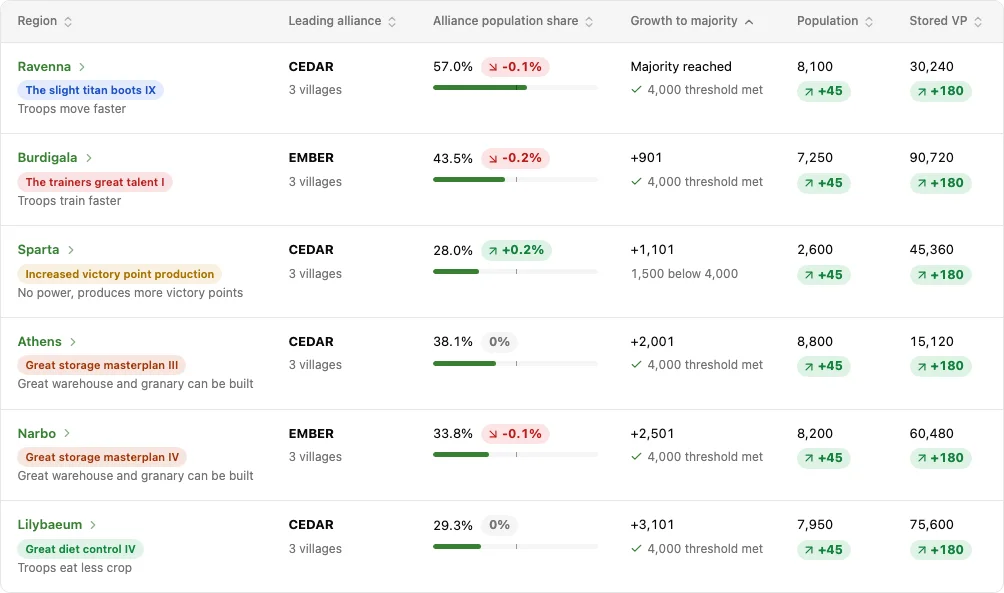
Open Regions, select your alliance, and compare its position across the map. See population share, growth needed for a majority, Ancient Powers and stored Victory Points in one view. Sort by Growth to majority to start with the smallest gaps.
Historical comparisons show how the balance has changed over 24 hours, 3 days, 7 days or 30 days when snapshots are available. Stored VP is the stock held in villages, not daily VP production.
Test a conquest before choosing a target
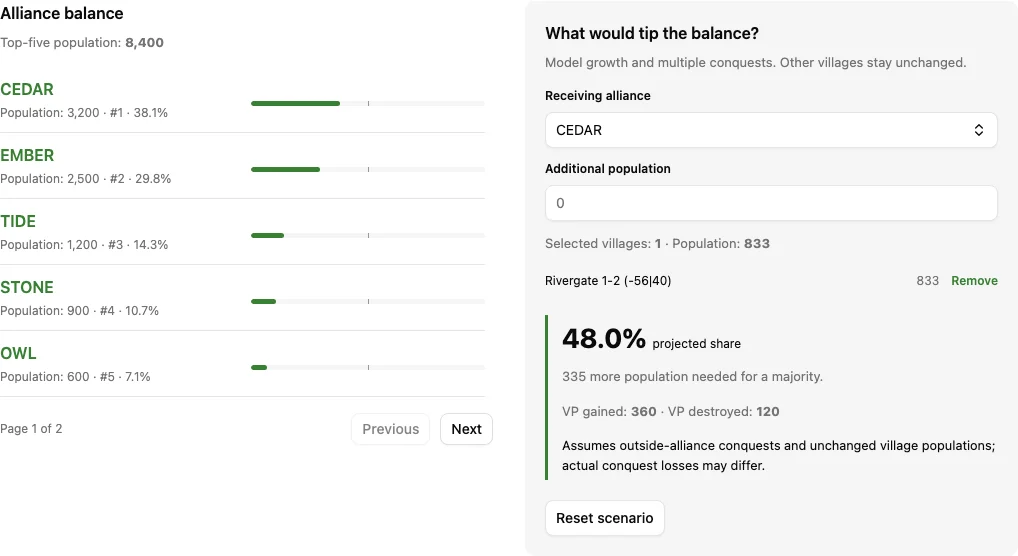
Open a region and choose the receiving alliance. Add population, select villages with Model conquest, or combine both. The scenario recalculates the population balance and the top five after your changes.
In the Athens demo, CEDAR starts at 38.1%. Modelling the conquest of EMBER’s 833-population Rivergate 1-2 raises it to 48.0%, leaving a growth gap of 335 population. Capitals and your receiving alliance’s own villages cannot be selected as conquest targets.
Keep important regions on your watchlist
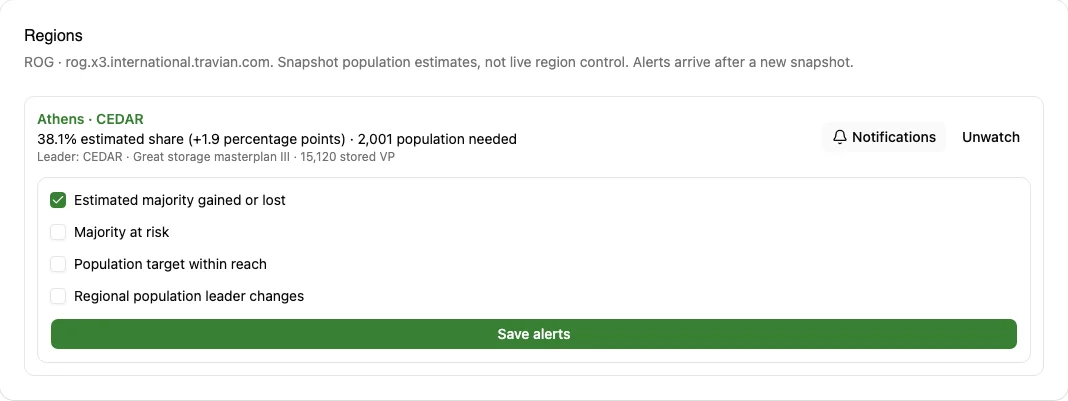
On your linked ROG world, open a region, choose the alliance you want to follow, and select Watch region. Keep it private or, if you own a TraviTools alliance, add it to the shared alliance watchlist. Members can read the shared watches; owners manage them.
Watchlist shows the alliance’s estimated share, change since the previous observation, growth gap and population leader. Majority-change alerts are enabled by default. You can also choose a warning when the majority gets thin, when a population target comes within reach, or when the population leader changes.
Alerts follow new map snapshots rather than live game events. Region options appear only when your selected account is on a ROG server. Selecting a standard world hides those options, even if you also have a ROG account.
See regional changes in Discord
- Choose alerts per region: estimated majority gained or lost, majority at risk, a population target within reach, or a change in the population leader.
- Threshold alerts fire when the estimate crosses your setting. Staying below the same warning threshold does not trigger another alert on every snapshot.
- Delivery depends on your Discord connection, enabled notifications and applicable plan. The same regional changes also appear in TraviTools notifications.
Connect Discord in Account settings and enable watchlist DMs to receive your private region alerts. Private Discord delivery requires Personal benefits and follows your selected immediate or daily mode and quiet hours. For shared watches, the alliance owner connects Discord with an active Alliance plan; updates go to the alliance’s configured watchlist channel.
These two fictional examples show separate changes in Athens. Each alert names the server, region and watched alliance, with the old and new shares. Select the linked region in the real message to inspect it, or use Open watchlist to review your watches.
A private heads-up when your majority slips
With majority-change alerts enabled, a new snapshot takes CEDAR from 53.4% to 49.7% in Athens. The alert arrives in your DMs when personal Discord delivery is enabled.
An alliance warning before the majority is lost
The owner enables Majority at risk and sets the threshold to 55%. When CEDAR falls from 56.2% to 53.4%, the shared watch posts to the connected alliance’s watchlist channel. CEDAR still has an estimated majority.
ROG details beyond the regional map
Alliance Resource Push filters ROG contributors against the recipient’s in-game alliance. Its member list and logging controls reflect that eligibility, so a TraviTools group spanning several in-game alliances does not treat everyone as an eligible sender.
In Crop Planner, choose City (Annual Special) when planning a city. It uses the city field-level cap when building your upgrade plan. Check the village type yourself when starting from an imported village.
Connect your world, or explore as a guest
You can explore the public Regions demo without an account. Its alliances and villages are fictional, and it uses the same population and scenario calculations as the signed-in tool.
For your own data, create an account, then add your ROG server and player in Account settings. Choose a Personal or Alliance plan, then select that account in the sidebar to use its world. Regions and region watches for your own world require a paid plan and a linked ROG account; the fictional demo stays free.
For a wider view, use Server Statistics, Player Search and World Conquests alongside Regions. Read our ROG case study for the tracked-account census and a worked regional example.
Population estimates, with the right context
The map data does not reveal banned or vacation-mode flags, securing timers, private armies or defensive coverage. Shares and alerts are estimates of population position; they do not certify live regional control. Confirm the position in Travian before committing troops.
The screenshots on this page show the real TraviTools interface with fictional data. No player account or production game data was changed to create them.