
Travco or TraviTools: which should you choose?
Choose TraviTools if you want player research, watchlists and village development alongside alliance coordination in one ad-free workspace. It is a useful Travco alternative when your daily routine includes checking rivals, finding potential farms and deciding what to build next. You can start with public tools before setting up shared alliance workflows.
Evaluate Travco if its established alliance workflow is the reason you are looking for a tool. Its public feature overview describes attack coordination, defence planning, artifact organization, supply monitoring and farmlist analysis. If your team already uses those features successfully, test a specific improvement before moving everyone.
This comparison is written by TraviTools and reflects our editorial judgment, not an independent benchmark. We checked Travco’s public feature and pricing pages on 31 October 2026 against the TraviTools features described below. A feature not documented in those pages is not necessarily unavailable.
Travco vs TraviTools: feature comparison
Both products cover personal and alliance tasks. Compare the job you need to do rather than counting checkmarks. Travco entries below are based on its feature overview and plan descriptions; TraviTools access depends on the feature and plan.
| Your task | Travco | TraviTools |
|---|---|---|
| Find potential farms | Inactive search and farmlist analysis | Inactive Finder, player research and watchlists |
| Plan village development | Equivalent saved build checklist not verified | Second-village checklist and crop upgrade build orders |
| Coordinate attacks | Personal and group attack planning | Attack planning and shared Operations |
| Organize defence | Incoming analysis and defence requests | Reported attacks, defence requests and troop commitments |
| Bring updates into Discord | Discord bot listed on Professional | Private alerts on Personal; shared coordination on Alliance |
| Organize artefacts | Artifact organization | Artefact planner and capturer assignments |
| Track resource support | Supply monitoring | Resource Push contribution tracking |
Where TraviTools fits your daily research
Start with Player Search to inspect a player’s villages and history, then use Alliance Search for the wider group context. Save relevant players or alliances to your Watchlist so the next session starts with the targets you already researched.
For example, before treating a nearby village as a farm, check its owner, alliance and recent changes. The Inactive Finder narrows the search using population snapshots and distance. A lack of growth is a reason to investigate, not proof that a village is empty or safe to raid.
TraviTools world-change alerts rely on snapshots, not live access to another player’s account. The activity monitor estimates patterns from population growth; it cannot reveal login times. Check world coverage and available history before relying on either view for your server.
Village planning: turn a calculation into your next build
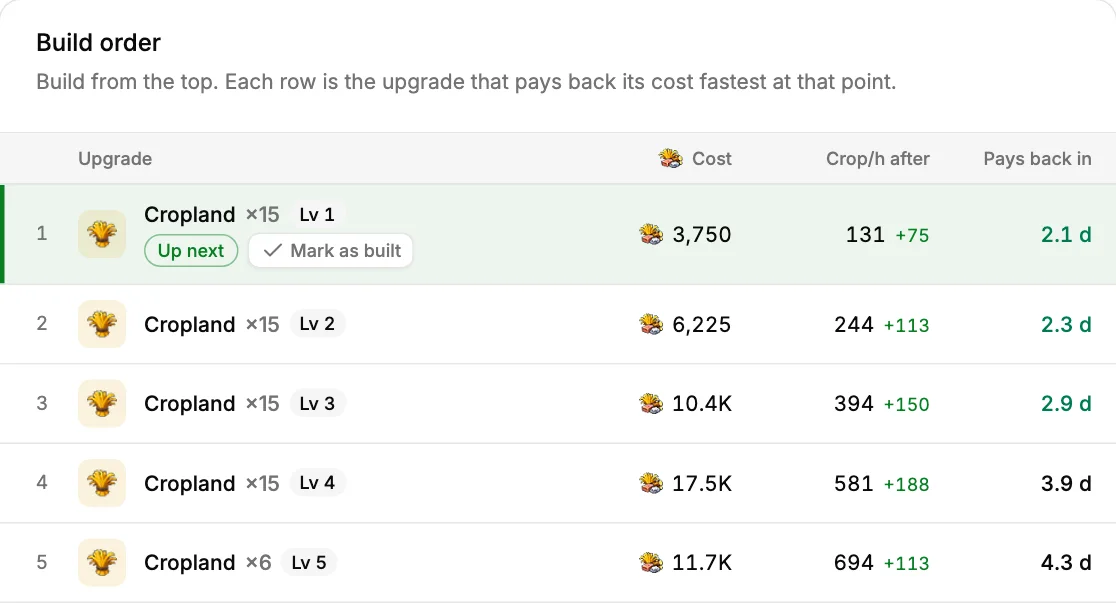
A strong reason to add TraviTools to your routine is its development planning. The second-village checklist gives you an opening sequence to follow, with saved progress when you sign in and add your world. The Crop Planner compares upgrades using your village layout, current levels, oases, server speed and bonuses.
In the worked example below, the first crop upgrades cost 3,750 resources and add 75 crop per hour. That is 50 hours of simple payback. Your village inputs change the order; payback measures resource efficiency, not the time until construction finishes. Read the Crop Planner guide for the settings and limitations.
These are concrete tools to try even if your alliance keeps its coordination elsewhere. Choose one village, enter its actual settings and compare the suggested next upgrade with your current plan.
Compare crop upgrades for your village
Alliance coordination and Discord: test the whole workflow
TraviTools brings reported incoming attacks, defence requests, scouting, Operations and resource pushes into the alliance workspace. The Discord integration guide shows the owner and member setup, alerts and actions. Shared Discord coordination requires the Alliance plan; members must complete the relevant account links and permissions.
Before adopting a new tool, run one small exercise: have a member report an incoming attack, create a defence request and check that the intended people can respond. Then test an operation assignment and its reminders. This reveals whether the workflow suits your team more clearly than a long feature list.
Reported attacks must be supplied to TraviTools. World snapshots do not detect incoming armies. Likewise, a resource-push contribution record and live merchant monitoring are different workflows: decide which information your coordinators actually need.
Travco and TraviTools pricing: compare access, not just the fee
At the review date, Travco’s pricing page lists Basic at €0, Plus at €2.99 per month and Professional at €6.99 per month. Plus includes its browser extension and farmlist analytics; Professional adds group-management features. The page advertises a 30-day trial. Check current terms before subscribing.
TraviTools offers Free, Personal and Alliance plans. Free covers core tools and a watchlist for one player or alliance, with one Travian server per account. Personal adds features such as an unlimited watchlist, private notifications, multiple Travian accounts and the activity monitor. Alliance adds shared coordination and alliance Discord features. See TraviTools pricing for current amounts, billing periods and availability.
The plans are not one-to-one equivalents. Compare the features your members will actually use, who needs paid access and how much setup the team needs. Start with a free workflow, then choose a paid plan when it solves a recurring task.
How to try TraviTools as a Travco alternative
Begin with a familiar player in Player Search, check their alliance and try a crop plan for your own village. Create a free account when you want to save supported progress and follow a target. This gives you a useful comparison without reorganizing your whole alliance first.
If you later move shared work, agree where active requests and assignments will live, and verify the new setup with a small group. This guide does not describe an automatic Travco migration; do not assume existing plans, reports or memberships transfer between the products.
For a broader comparison, see our Travian tools guide and TraviTools vs Gettertools article. The reason to choose TraviTools is the combination of research, saved planning and coordination that helps with your next session.
Common questions
Is TraviTools an alternative to Travco?
Yes. TraviTools combines player and alliance research, inactive search, saved village planning and alliance coordination. Compare the workflows you need before moving a team that already uses Travco.
Can I use TraviTools alongside Travco?
Yes. You can use TraviTools for research or crop planning while your alliance coordinates elsewhere. Agree which system holds active assignments so members do not work from conflicting plans.
Is TraviTools free to use?
TraviTools has a Free plan for core tools, one Travian server and a watchlist for one player or alliance. Personal and Alliance plans add alerts and coordination features. Saving supported progress requires an account.
Does TraviTools automatically import my Travco account?
This comparison does not provide an automatic migration process. Set up your TraviTools world and alliance, then verify the workflows and data you need before moving active coordination.